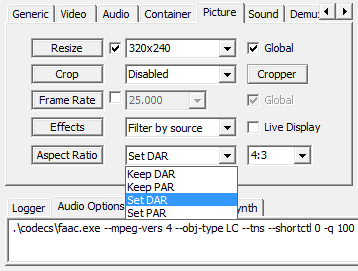
As you might have noticed, the aspect ratio option has been changed. The new option has 4 choices as shown above. Here I explain the feature of each option.
MediaCoder的新版本中,宽高比设置做了改动。现在界面上提供了4种控制宽高比的选择,在此做一下解释说明。
1. Keep DAR
This will keep the original DAR (display aspect ratio) for the output file. In this case, changing the resolution won’t affect the display aspect ratio.
2. Keep PAR
This will keep the original PAR (pixel aspect ratio) for the output file. This is usually used when you are applying cropping (but no resizing which cause screen geometric change).
3. Set DAR
This will set the DAR of output file to your specified value (the value can be entered or chosen in the blank next to the aspect ratio option). This is usually used when you change the DAR of the original file or apply cropping + resizing to fit for screen geometric size different from the original target.
4. Set PAR
This will set the PAR of output file to your specified value (the value can be entered or chosen in the blank next to the aspect ratio option) . This is usually used when you change the PAR of the original file. This is usually used when you know the target PAR and want to control the DAR through resolution.
Here is a discussion about this topic
1. Keep DAR
该选项用于保持原始文件的DAR (显示宽高比)。在这种情况下,改变分辨率不会影响转换后文件播放时宽高比。
2. Keep PAR
该选项用于保持原始文件的PAR (像素宽高比),一般用于进行画面裁剪(但不进行导致分辨率宽高比改变)的情况。
3. Set DAR
该选项用于设置转码后文件的DAR(设置的DAR值可以在宽高比选项右侧的框中输入或下拉选择),经常用于进行画面裁剪+分辨率改变,以适应不同几何形状的屏幕。
4. Set PAR
该选项用于设置转码后文件的PAR(设置的PAR值可以在宽高比选项右侧的框中输入或下拉选择),经常用于已知目标PAR,并通过分辨率控制DAR的情况下。
How do I decode/encode for Phillips Aria players which use SMV video????
Hey there sir, I don’t know if you’re the author of Media Coder, but if you are, I wanted to tell you how much I appreciate your program (sorry there was no contact emails so I’m writing this here). I use it all the time to transcode audio from videos and also to transcode videos for my MP4. Since I’ve tried to stop using pirated software, your program has been all the more a blessing to me. THank you so much. I’m praying GOd will bless you.
-James