From this day, you will not be able to find MediaCoder on SourceForge.net. Through the years, MediaCoder was hosted on SF.net as an open-source project and through the years I was the only active maintainer of the project and have been spending time and efforts providing the community with the best free media transcoder. Many people praise for the work that I’ve done and many support me by making a donation. The only thing I’ve never got is a significative help on the development. Meanwhile, I was receiving some requests for explaining or modifying the code from some people who are quite likely working for some enterprises although they usually claimed they just wanted to “study” the code. When I made a decision that I no longer commit my new code to SF.net, it seems many people are infuriated. They spread words here and there about some disputable and untruthful facts. Under the pressure, I was opening the part of the source code of MediaCoder on SF.net again. But these people are still not satisfied as not getting every line of the source code and keep snitching. I kept contact with the senior manager of SF.net and I can see he was kept annoyed by those paranoias. Now the disturbance can come to an end by the removal from SF.net. I can once again concentrate on the development of MediaCoder without spending time and efforts to please those people.
Here I reaffirm, MediaCoder is and will always be a freeware and I have no plan to turn it into a commercial software in any time.
Also the formal web site of mediacoder.sourceforge.net no longer exists. The official web site of MediaCoder is www.mediacoderhq.com.
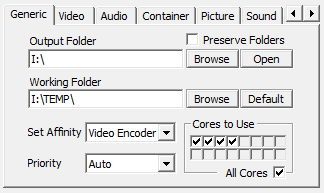 在最新的Build 4560中新增了设置影音编解码器的处理器亲和度(Processor Affinity)参数。通过设置代表所有处理器或处理器核心的复选框,可以控制哪些处理器或者核心被使用,哪些不被使用。例如,在一个四核处理器的系统上,你会看到有四个复选框是可选的,如果一个复选框没有被选中,那相应的处理器或者核心就不会被使用。当你的处理器有很多核心时,这个功能就比较有用了。你可以自行分配解码器和编码器所使用的核心,也可以预留一些核心供其他应用使用。